

A server rack is a standardized metal framework used to mount servers, networking equipment, storage devices, and supporting hardware such as power distribution units (PDUs). Most server racks follow the 19-inch width standard, which ensures compatibility across equipment from different manufacturers.
Rather than stacking devices randomly on shelves or floors, racks allow equipment to be securely mounted in vertical slots. This improves airflow, simplifies cable management, and makes maintenance far more efficient. In data centers, server racks also help enforce consistent layouts for power, cooling, and monitoring.
Types of Server Racks
Server racks come in several common designs, each suited to different deployment environments, space constraints, and operational requirements. Understanding these differences helps ensure the rack supports not only today’s equipment, but also future expansion and maintenance needs.
Open Frame Racks
Open frame racks consist of a bare metal structure without doors or side panels. They provide maximum airflow and unrestricted access to equipment, making them easy to install, cable, and maintain. These racks are typically used in secure, climate-controlled environments such as data centers or network rooms where physical security and noise containment are not primary concerns.
Enclosed Server Cabinets
Enclosed server cabinets feature front and rear doors, removable side panels, and optional locking mechanisms. This design offers better control over airflow, improved security, and reduced noise compared to open racks. Enclosed cabinets are the most common choice in modern data centers, enterprise server rooms, and colocation facilities where equipment density, cooling efficiency, and access control are critical.
Wall-Mount Racks
Wall-mount racks are compact enclosures designed for lightweight IT and networking equipment. They are commonly used in branch offices, retail locations, and edge computing sites where floor space is limited. While their capacity is smaller, wall-mount racks provide a practical way to centralize equipment and protect it from accidental damage or unauthorized access.
Key Components Inside a Server Rack
A server rack typically contains much more than just servers. Common components include rack-mounted servers, network switches, storage systems, PDUs for power distribution, and cable management accessories.
Vertical and horizontal cable managers help keep power and data cables organized, improving airflow and reducing maintenance errors. Many racks also include blanking panels, which block unused spaces to prevent hot and cold air mixing, improving cooling efficiency.
Together, these components transform the rack into a complete infrastructure unit rather than just a mounting frame.
Power Distribution and Cabling in Server Racks
At the core of rack power distribution is the Power Distribution Unit (PDU). PDUs deliver power from upstream sources to servers, storage, and network devices within the rack. Depending on the deployment, PDUs may range from basic units that simply distribute power, to intelligent models that provide outlet-level monitoring, remote switching, and energy usage data. Selecting the right PDU type ensures balanced loads, avoids circuit overloads, and supports capacity planning as rack density increases.
Equally important is power redundancy. Many server racks are designed with A/B power feeds, allowing equipment with dual power supplies to remain operational even if one power path fails. This redundancy is common in data centers and increasingly adopted in edge and enterprise environments where uptime is critical.
Cabling plays a dual role in both connectivity and airflow management. Poorly organized cables can block airflow, increase hot spots, and complicate troubleshooting. Using vertical and horizontal cable managers, proper bend radius control, and clear labeling helps maintain clean airflow paths while making it easier to identify and replace equipment. Separating power and data cables also reduces interference and improves safety.
How to Choose the Right Server Rack
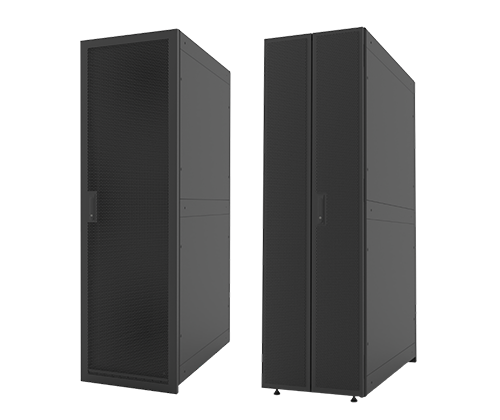
ATTOM Rack System:A Reliable and Scalable Rack Solution for Modern Data Centers
Choosing the right server rack is not just about fitting equipment—it’s about ensuring stability, efficient cooling, ease of maintenance, and room for future growth. A poor rack choice can limit expansion, complicate airflow management, and increase operational risk over time.
Start by determining the rack size and height, typically measured in rack units (U). Standard racks such as 42U or 45U are common in data centers, while shorter racks may be better suited for edge or office environments. Beyond height, rack depth is equally important. Modern servers, especially those designed for high-performance or GPU workloads, are deeper than older models and require sufficient rear clearance for power connections and airflow.
Next, evaluate the load-bearing capacity of the rack. Fully populated racks with servers, storage systems, and power equipment can become extremely heavy. The rack must safely support both static weight and dynamic loads during installation or maintenance. This is especially critical in seismic zones or mobile and modular deployments.
Cooling and airflow compatibility should also guide rack selection. Enclosed cabinets should support proper front-to-back airflow, perforated doors, and compatibility with hot- and cold-aisle layouts. If higher-density equipment is expected in the future, ensure the rack can accommodate airflow accessories, blanking panels, or in-rack cooling solutions.
Security and access control are another key consideration. Enclosed racks with lockable doors and side panels are preferred in shared facilities or edge sites where physical access is less controlled. At the same time, the rack should allow easy access for technicians to perform routine maintenance without unnecessary disassembly.
Finally, consider future scalability and standardization. Choosing racks that align with industry standards makes it easier to add equipment, replace components, and integrate with existing infrastructure. A well-chosen rack supports long-term operational efficiency, not just immediate deployment needs.
Leave A Comment
You must be logged in to post a comment.