

A rack-mounted UPS (Uninterruptible Power Supply) is a backup power system designed to fit into a standard 19-inch server rack. It provides continuous, stable power to critical IT equipment during utility outages, voltage fluctuations, or unstable grid conditions.
Unlike traditional floor-standing units, rack-mounted UPS systems feature a modular design ideal for high-density data centers, telecom rooms, and edge computing environments.
The system converts incoming AC power to DC to charge the batteries. When the grid becomes unstable, the batteries instantly supply power to the inverter, ensuring uninterrupted operation. This switchover happens within milliseconds, keeping servers, storage, and networking devices fully online.
Key Components of a Rack-Mounted UPS
A typical rack-mounted UPS includes:
-
Rectifier – Converts AC to DC for battery charging and power conditioning
-
Inverter – Converts DC back to clean AC output
-
Battery modules – Provide backup power during outages
-
Static switch – Enables seamless transfer between utility and battery power
-
Control and monitoring modules – Support SNMP, web UI, and DCIM integration
Modern rack-mounted UPS systems allow remote monitoring, fault logging, and centralized management.
How UPS Systems Ensure Power Continuity
When utility power fails, internal detection circuits trigger an immediate switch to battery power. Once power returns, the UPS automatically recharges and switches back to normal operation.
Online double-conversion topology isolates the load from voltage fluctuations and harmonic noise, delivering the highest-quality power protection for mission-critical workloads.
Rack-Mounted vs. Tower UPS: Key Differences
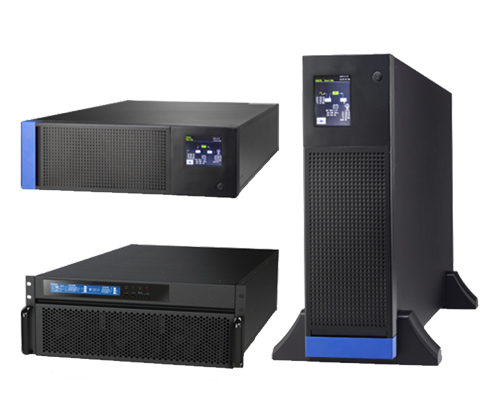
ATTOM Agile-Power:Online double-conversion UPS with a standard 19-inch rack design, offering comprehensive multi-layer protection features.
Form Factor
Tower UPS units are free-standing and larger, while rack-mounted UPS systems use a flat, modular design that fits standard 19-inch racks.
Space Efficiency
Rack-mounted UPS units sit in the same rack as IT equipment, maximizing floor space—ideal for high-density data centers.
Cooling Design
Rack-mounted UPS systems rely on rack airflow management and hot/cold aisle design. Improper ventilation can cause battery heat buildup. Tower models have dedicated airflow paths and simpler cooling.
Application Scenarios
-
Rack-mounted: Data centers, telecom sites, edge nodes
-
Tower: Labs, hospitals, small server rooms
Maintenance
Rack-mounted UPS systems support hot-swappable modules and maintenance without downtime—critical for low MTTR environments.
Why Choose a Rack-Mounted UPS?
Ultra-Fast Response
Shorter cabling and a more direct power path reduce switching delay—vital for high-frequency trading, real-time analytics, and telecom nodes.
Optimized Layout & Modular Scalability
Rack-mounted systems save floor space, simplify cable routing, and integrate seamlessly with existing IT infrastructure.
Advanced Monitoring & Control
With built-in SNMP, web management, and event logging, they integrate well with DCIM platforms and offer deeper operational visibility.
Future-Proof Expansion
Support for hot-swappable modules, battery expansion, and parallel redundancy makes upgrades flexible and cost-effective.
Improved Reliability & Lower TCO
Although the upfront cost may be higher, reduced cooling losses, simplified maintenance, and better energy efficiency significantly lower long-term operational expenses.
How to Select the Right Rack-Mounted UPS
Power and Load Planning
Assess total power requirements, peak load, future growth, and redundancy needs. Reserve 20–30% headroom for expansion.
Battery Technology
-
Lead-acid: Cost-effective
-
Lithium-ion: Longer life, better thermal performance
-
Other chemistries: For specialized needs
Consider temperature sensitivity, cycle life, charging time, and module design.
UPS Topology
-
Online double-conversion: Highest protection, zero transfer time
-
Line-interactive / standby: Cost-sensitive scenarios
Evaluate efficiency curves and conversion losses.
Physical Compatibility
Check rack depth, height (U-space), weight, airflow direction, and cable access.
Redundancy & Backup
Plan for N+1 designs, bypass options, and integration with PDUs and generators.
Installation & Maintenance Best Practices
-
Placement: Install UPS modules near the bottom of the rack for stability and optimal airflow
-
Airflow design: Maintain proper cold-aisle / hot-aisle segregation
-
Battery management: Monitor temperature, internal resistance, and charge cycles
-
Firmware updates: Keep control modules and monitoring software up-to-date
-
Regular testing: Perform load transfer and bypass tests every 6–12 months
-
Spare parts policy: Maintain a clear parts inventory and maintenance workflow
-
Environmental controls: Keep temperature and humidity within recommended ranges
-
Load segmentation: Separate critical and non-critical loads to optimize battery runtime
FAQ
How long does a rack-mounted UPS last?
Typically 5–10 years, depending on battery type, load, environment, and maintenance. Lithium-ion can last 10–15 years.
Can rack-mounted UPS units run in parallel?
Yes. Most enterprise UPS systems support N+1 or N+N configurations.
How often should UPS batteries be replaced?
Lead-acid: every 3–5 years
Lithium-ion: 8–10 years
Replace earlier if capacity drops by more than 20%.
Do I need to replace the UPS when upgrading servers?
Not necessarily. As long as its rated power and output characteristics match, you can expand capacity through modules or parallel units.
How long can a UPS provide backup power?
Depends on battery capacity and load. Common setups offer 5–30 minutes—enough for generators to start or to shut down systems safely.
Leave A Comment
You must be logged in to post a comment.