What Is a Micro Data Center? Definition, Types, Components, Benefits & Solutions
A micro data center is a compact, integrated data center system that combines IT equipment with the supporting infrastructure required for reliable operation, including power, cooling, networking, physical security, monitoring, and, where required, fire protection.
Unlike a conventional data center that typically operates from a dedicated facility, a micro data center is designed to deliver essential data center capabilities within a much smaller physical footprint. It can be deployed inside an office, factory, retail location, telecommunications site, warehouse, healthcare facility, or other space-constrained environment.
Micro data centers are particularly useful when organizations need to place computing and storage closer to users, machines, or data sources. They can support edge computing, distributed IT, local data processing, AI inference, industrial applications, and remote infrastructure without requiring a purpose-built data center facility.
A micro data center does not necessarily replace a centralized or hyperscale data center. In many architectures, it works alongside centralized data centers and cloud infrastructure as a distributed computing node.
What Is a Micro Data Center?
A micro data center is a small-scale, self-contained data center infrastructure system designed to support local IT workloads.
The defining characteristic is not simply physical size. A micro data center integrates multiple infrastructure functions into a standardized or configurable system so that IT equipment can operate reliably outside a conventional data center environment.
A typical micro data center may integrate:
- IT racks and servers
- Power distribution
- UPS and backup power
- Cooling and thermal management
- Network connectivity
- Physical security
- Environmental monitoring
- DCIM or remote management
- Fire detection and suppression where required
The configuration depends on the IT load, rack density, site environment, availability requirements, and application.
For example, a small branch office may require only a single rack with UPS, cooling, and monitoring, while an industrial site may require multiple racks, enhanced environmental protection, redundant power, and higher-capacity cooling.
Micro Data Center vs. Small Server Room
A micro data center is more than a server rack or an enclosed server room.
A traditional server room may contain IT equipment but rely on building-level electrical, HVAC, fire protection, and security systems. A micro data center integrates a larger portion of these infrastructure functions into a coordinated system.
This distinction is important when deploying IT infrastructure in locations that were not originally designed to operate as data centers.
How Does a Micro Data Center Work?
A micro data center operates as an integrated infrastructure platform.
Power enters the system through the site’s electrical supply and is distributed to the IT equipment through the power architecture. UPS systems can provide backup power and power conditioning where required.
The cooling system removes the heat generated by servers and networking equipment. Depending on the IT load and rack density, this may use precision air cooling, rack-level cooling, in-row cooling, rear-door heat exchangers, or liquid cooling.
Networking connects local workloads with users, devices, cloud platforms, centralized data centers, and other edge locations.
Monitoring systems continuously track infrastructure conditions such as temperature, humidity, power, equipment status, and alarms. Remote management is particularly valuable when the micro data center is deployed at an unmanned or geographically distributed site.
The result is a compact infrastructure node that can operate independently or as part of a larger distributed IT architecture.
Micro Data Center Architecture
A micro data center is built as an integrated infrastructure system rather than a collection of independent components. The architecture typically combines IT equipment with power protection and distribution, cooling, networking, physical security, environmental monitoring, and remote management within a compact deployment.
The exact architecture depends on the IT workload, rack density, site environment, availability requirements, and deployment location. A single-rack office deployment may require a relatively simple power and cooling configuration, while an industrial or AI edge deployment may require higher-capacity power systems, enhanced thermal management, environmental protection, and redundant infrastructure.
A typical micro data center architecture can be viewed as four interconnected layers:
| Layer | Typical Infrastructure | Primary Function |
|---|---|---|
| IT Layer | Servers, storage, networking, GPUs, edge devices | Runs local computing and data processing workloads |
| Power Layer | Utility input, UPS, PDU, backup power | Provides reliable and protected power to IT equipment |
| Cooling Layer | Precision air cooling, rack cooling, RDHx, liquid cooling | Removes heat according to the IT and thermal load |
| Management & Protection Layer | Monitoring, DCIM, access control, fire protection | Protects infrastructure and enables local or remote operation |
The key principle is that these layers should be designed as a coordinated system. Increasing IT density, for example, affects both power capacity and cooling requirements, while remote or outdoor deployments may require additional environmental protection and monitoring.
Key Components of a Micro Data Center
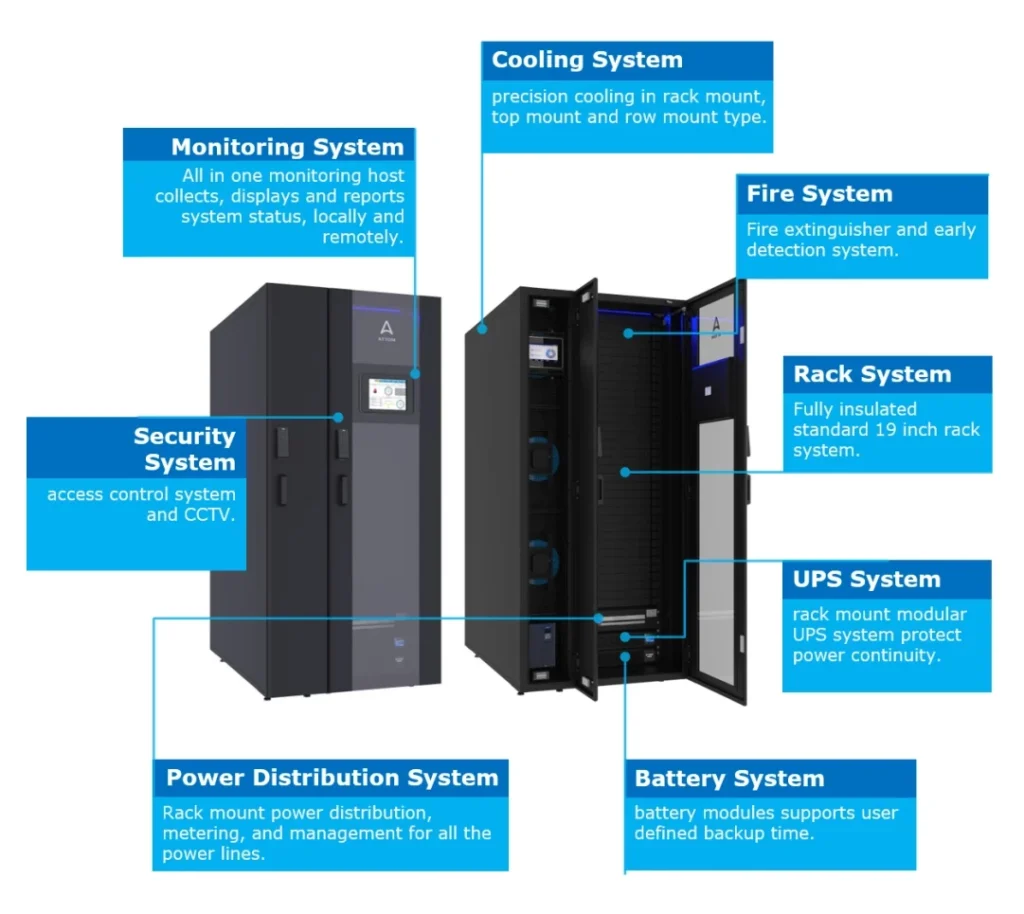
The exact configuration varies by application, but most micro data centers are built around several core infrastructure systems.
| Component | Primary Function |
|---|---|
| IT Rack & Equipment | Hosts servers, storage, networking, and other IT equipment |
| Power Distribution | Delivers electrical power to critical IT loads |
| UPS | Provides backup power and power protection |
| Cooling | Removes heat and maintains appropriate operating conditions |
| Networking | Connects local workloads with enterprise, cloud, and edge networks |
| Security | Protects equipment and restricts unauthorized physical access |
| Monitoring & DCIM | Provides infrastructure visibility, alarms, and remote management |
| Fire Protection | Detects and suppresses fire where required |
| Enclosure | Provides physical organization and environmental protection |
The important design principle is that these components should be engineered as a coordinated system rather than selected independently.
Types of Micro Data Centers
Micro data centers can take several physical and architectural forms. There is no single enclosure or rack configuration that defines the category.
Rack-Mounted Micro Data Center
A rack-level micro data center integrates IT equipment and supporting infrastructure into one or a small number of standardized racks.
This approach is suitable for:
- Branch offices
- Retail locations
- Network rooms
- Small enterprise sites
- Industrial applications
- Space-constrained deployments
Rack-based systems are often attractive when organizations need standardized infrastructure that can be replicated across many locations.
Cabinet Micro Data Center
A cabinet micro data center integrates IT equipment, power, cooling, security, and monitoring into a protected cabinet or enclosure.
The cabinet can be deployed inside an existing building without requiring a dedicated data center room.
This configuration is useful where physical space is limited or where IT equipment must be protected from dust, unauthorized access, or other environmental conditions.
Modular Micro Data Center
A modular micro data center uses prefabricated infrastructure modules that can be configured according to the required IT load and deployment environment.
Compared with a simple rack or cabinet solution, a modular configuration can provide greater flexibility for higher-capacity or more demanding deployments.
The modular approach also makes it easier to standardize infrastructure across multiple locations.
Outdoor and Ruggedized Micro Data Center
Some deployments require infrastructure to operate outside conventional conditioned spaces.
Outdoor or ruggedized micro data centers may require additional protection against:
- High or low temperatures
- Humidity
- Dust
- Water
- Corrosive environments
- Physical intrusion
- Unstable power conditions
Industrial, telecommunications, transportation, energy, and remote infrastructure applications may require this type of deployment.
Micro Data Center vs. Edge Data Center
Micro data center and edge data center are related concepts, but they are not interchangeable.
A micro data center describes a compact physical infrastructure system, while an edge data center describes a deployment location and computing architecture closer to users, devices, or data sources.
A micro data center can function as an edge data center when it is deployed at the network edge.
However, not every micro data center is necessarily an edge data center.
For example, a company may deploy a micro data center inside a branch office primarily to support local IT infrastructure. That system is a micro data center, but its primary purpose may not be edge computing.
| Factor | Micro Data Center | Edge Data Center |
|---|---|---|
| Primary Definition | Compact integrated infrastructure | Distributed computing location |
| Focus | Physical infrastructure | Computing architecture and location |
| Typical Size | Rack, cabinet, or compact modular system | Can range from small systems to larger facilities |
| Deployment | Offices, factories, retail, telecom, remote sites | Close to users or data sources |
| Edge Computing | May support edge workloads | Usually designed around edge workloads |
| Relationship | Can be an edge infrastructure platform | Can use micro data centers as infrastructure |
This distinction helps prevent the two terms from being treated as synonyms.
Micro Data Center vs. Modular Data Center
A micro data center and a modular data center both use standardized infrastructure, but they generally operate at different scales.
A micro data center is typically designed around a compact IT footprint and localized computing requirements.
A modular data center can encompass larger modules, multiple racks, dedicated infrastructure rooms, containers, shelters, or other prefabricated structures.
The relationship can therefore be viewed as:
Micro Data Center → compact integrated infrastructure
Modular Data Center → modular deployment architecture that can scale from smaller systems to larger facilities
In practice, a micro data center may itself use modular construction principles.
Micro Data Center vs. Prefabricated Data Center
Prefabricated data center describes how infrastructure is manufactured and assembled, while micro data center describes the scale and integrated form of the deployment.
A prefabricated data center can be manufactured off-site and assembled or commissioned at the deployment location.
A micro data center can also be prefabricated, particularly when standardized rack or cabinet systems are factory-integrated and tested.
Therefore, these terms describe different dimensions of a solution and can overlap.
What Are the Benefits of Micro Data Centers?
Micro data centers are valuable when organizations need reliable computing infrastructure in locations where building a conventional data center is impractical.
Smaller Physical Footprint
Micro data centers provide data center infrastructure within a compact footprint.
This makes them suitable for offices, retail locations, factories, telecommunications sites, warehouses, and other environments where dedicated data center space is unavailable.
Faster Deployment
Factory-integrated systems can reduce the amount of infrastructure construction, assembly, and coordination required on site.
A standardized design can also be replicated across multiple locations, helping organizations establish consistent infrastructure across distributed sites.
Localized Computing and Lower Latency
Placing computing resources closer to users, machines, and data sources can reduce network distance and improve application responsiveness.
This is particularly important for applications such as industrial automation, video analytics, real-time monitoring, and AI inference.
Integrated Power and Cooling
Instead of relying entirely on building infrastructure, micro data centers can integrate power protection, distribution, and cooling into a coordinated system.
This is particularly useful when the deployment site does not have data-center-grade infrastructure.
Remote Management
Distributed infrastructure creates an operational challenge: IT teams may need to manage many locations without having personnel at every site.
Monitoring and DCIM capabilities allow operators to remotely track power, temperature, humidity, equipment status, alarms, and other infrastructure conditions.
Standardization Across Multiple Sites
Organizations deploying infrastructure across dozens or hundreds of locations can use standardized micro data center architectures.
Standardization can simplify:
- Procurement
- Deployment
- Commissioning
- Maintenance
- Monitoring
- Spare parts management
- Infrastructure upgrades
Environmental Protection
Micro data centers can be engineered for environments that are unsuitable for exposed IT equipment.
Depending on the design, enclosures can provide protection against dust, unauthorized access, temperature variation, humidity, and other site-specific conditions.
Where Are Micro Data Centers Used?
Micro data centers are most useful where computing needs to be distributed, localized, rapidly deployed, or operated within a constrained environment.
Enterprise IT Application
Enterprises today are operating in an increasingly complex and data-driven environment, where traditional infrastructure models often struggle to keep up with growing demands for performance, flexibility, and scalability. As business systems expand and operations become more distributed, ensuring consistent performance and operational efficiency has become a critical priority.
Edge Colocation
The next wave of technology innovation is already here with new applications transforming the way we live, work, and travel. The huge adoption of these new services drives exponential growth in the total demand for data.
Smart Manufacturing
Factories generate large volumes of data from machines, sensors, industrial control systems, cameras, and other connected equipment.
A local micro data center can process and analyze this data closer to the production environment, reducing dependence on remote processing for time-sensitive applications.
Industrial IoT
Industrial IoT applications often require local data collection, processing, storage, and communication.
Micro data centers can provide the infrastructure required to support these workloads at industrial locations.
Telecommunications and 5G
Telecommunications networks require computing infrastructure distributed across geographically dispersed locations.
Micro data centers can support localized processing and edge applications at network sites where space and infrastructure availability may be limited.
Video Analytics and AI Inference
Video analytics generates large amounts of data that may be inefficient to send continuously to a centralized data center.
A micro data center can provide local compute resources for video processing and AI inference, allowing selected data to be analyzed closer to the source.
Healthcare
Healthcare facilities may require local computing for medical applications, imaging, security systems, building management, and other workloads.
Micro data centers can provide localized infrastructure without requiring the facility to construct a conventional data center.
Warehouses and Logistics
Modern warehouses increasingly depend on automation, computer vision, robotics, wireless networking, and real-time inventory systems.
Local computing infrastructure can help support these applications where latency and network availability are important.
Micro Data Centers for AI and Edge AI
Micro data centers can support distributed AI workloads, particularly inference rather than large-scale model training.
AI inference at the edge may be required when applications need rapid responses or when transmitting all source data to a centralized AI data center is impractical.
Examples include:
- Industrial AI
- Machine vision
- Intelligent surveillance
- Autonomous systems
- Smart manufacturing
- Retail analytics
- Video analytics
- Real-time monitoring
AI workloads can also change the infrastructure requirements of a micro data center.
Higher-performance processors and accelerators may increase rack power density and heat generation. As a result, an AI-oriented micro data center may require higher-capacity power systems, enhanced thermal management, and more advanced monitoring than a conventional edge IT deployment.
For large-scale AI training and centralized high-density computing, however, a dedicated AI Data Center is generally a more appropriate architecture.
Cooling Options for Micro Data Centers
Cooling is one of the most important design considerations because the required cooling architecture depends directly on IT load and rack density.
Precision Air Cooling
Air cooling remains suitable for many conventional micro data center deployments.
It can be implemented through dedicated precision cooling equipment designed to maintain stable temperature and humidity conditions.
Rack-Level and In-Row Cooling
Higher-density deployments may use cooling systems positioned closer to the IT load.
Rack-level and in-row cooling can improve the efficiency of heat removal when conventional room-level cooling becomes less effective.
Rear-Door Heat Exchangers
Rear-door heat exchangers can remove heat directly from the exhaust side of high-density server racks.
They can be considered when rack density increases but a full liquid-cooling architecture is not yet required.
Liquid Cooling
Higher-density AI and HPC workloads may require liquid cooling technologies such as direct-to-chip cooling or immersion cooling.
The appropriate technology depends on server design, rack density, heat load, facility water availability, and system architecture.
The key principle is simple: select the cooling system based on the IT heat load rather than the physical size of the micro data center.
How to Design a Micro Data Center
Micro data center design should begin with the workload rather than the enclosure.
A practical design process should evaluate the following factors.
For a practical design assessment, engineers and project teams should collect detailed information about the workload, site environment, power supply, cooling requirements, cabinet configuration, security, fire protection, and monitoring requirements before finalizing the system architecture. See the Micro Data Center Design Questionnaire for a detailed project requirement checklist.
1. Define the IT Workload
Determine:
- Compute requirements
- Storage requirements
- Networking requirements
- Number of servers
- Required rack capacity
- Expected future growth
2. Determine Rack Density
Estimate the power and thermal load of each rack.
This is particularly important for AI and high-performance computing because rack density can determine whether conventional air cooling is sufficient.
3. Design the Power Architecture
Evaluate:
- Utility power
- UPS capacity
- PDU configuration
- Backup power
- Power redundancy
- Input voltage
- Expected future capacity
4. Select the Cooling Architecture
Cooling should be selected according to the actual thermal load.
Low-density IT may use air cooling, while higher-density workloads may require rack-level cooling, RDHx, direct-to-chip liquid cooling, or other advanced thermal technologies.
5. Evaluate the Site Environment
Consider:
- Ambient temperature
- Humidity
- Dust
- Altitude
- Water availability
- Available electrical capacity
- Physical access
- Noise
- Fire protection
- Security requirements
6. Plan Connectivity
Determine how the micro data center will connect to:
- Local devices
- Enterprise networks
- Cloud platforms
- Centralized data centers
- Other edge locations
Network redundancy may also be required for business-critical applications.
7. Define Availability Requirements
Availability requirements determine the appropriate level of redundancy for:
- Power
- UPS
- Cooling
- Network connectivity
- Monitoring
- Critical equipment
Not every micro data center requires the same redundancy architecture.
8. Plan Remote Management
Distributed infrastructure should be designed for remote visibility from the beginning.
Monitoring should provide sufficient information to identify power, environmental, cooling, and equipment problems before they cause service disruption.
9. Plan for Future Expansion
A micro data center should not only meet today’s requirements.
Allowing capacity for additional racks, power, cooling, networking, or storage can prevent expensive redesigns when workloads grow.
What Should You Consider When Choosing a Micro Data Center Solution?
When comparing micro data center solutions, organizations should look beyond the enclosure or rack itself.
Key evaluation criteria include:
| Evaluation Area | Questions to Ask |
|---|---|
| IT Capacity | How much compute and storage can the system support? |
| Rack Density | What is the maximum supported power per rack? |
| Power | What utility, UPS, and redundancy options are available? |
| Cooling | Can the system support the required thermal load? |
| Environment | Can it operate under the site’s temperature, humidity, and dust conditions? |
| Security | How is physical access controlled? |
| Monitoring | Can infrastructure be monitored remotely? |
| Networking | Does the architecture support the required connectivity and redundancy? |
| Deployment | How much site preparation is required? |
| Scalability | Can additional capacity be added later? |
| Maintenance | How are service and replacement components handled? |
| Standardization | Can the same architecture be replicated across multiple sites? |
The best solution is therefore not necessarily the smallest one. It is the solution that provides the required IT capacity, power, cooling, environmental protection, availability, and operational management within the constraints of the deployment site.
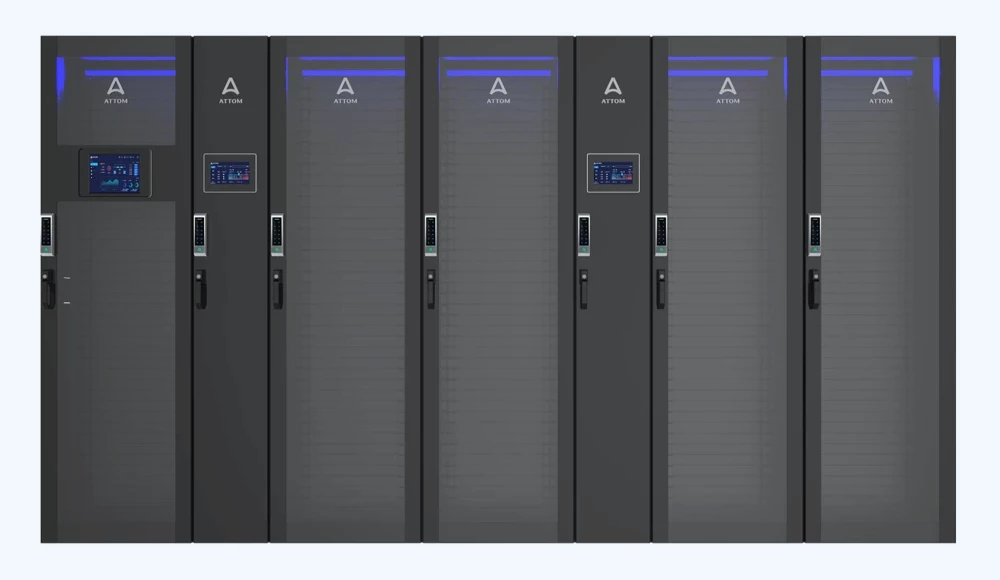
ATTOM AgileRax Micro Data Center
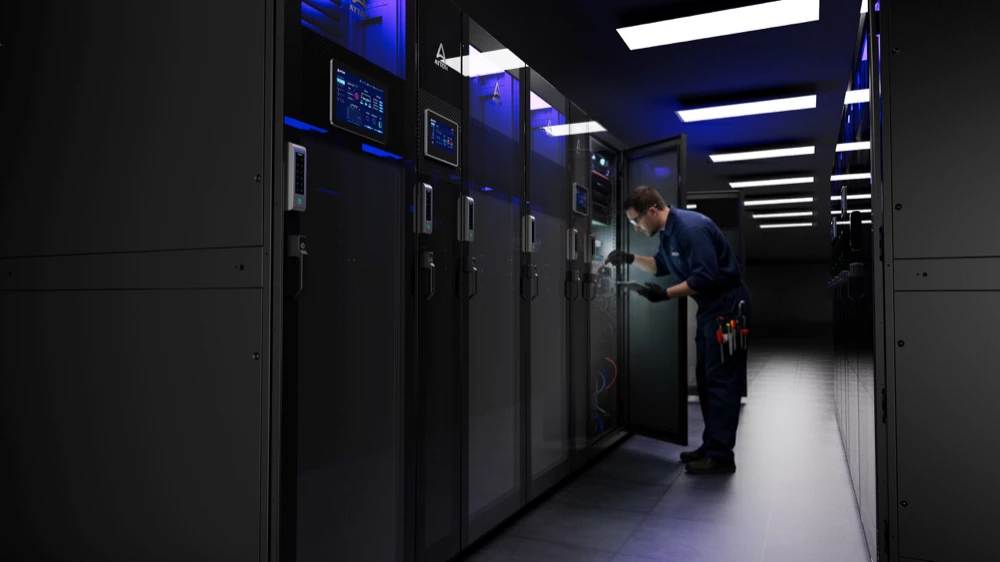
ATTOM AgileRax is a rack-level micro data center solution designed for distributed IT, edge computing, and space-constrained deployments.
The system integrates key infrastructure functions including IT rack infrastructure, power, cooling, security, and monitoring into a compact architecture.
AgileRax can be configured according to application requirements such as rack capacity, IT load, power requirements, cooling architecture, environmental conditions, and deployment location.
This makes the platform suitable for applications where organizations need to deploy localized computing infrastructure without constructing a dedicated data center facility.
Explore ATTOM AgileRax Micro Data Center →
Micro Data Center FAQs
What is a micro data center?
A micro data center is a compact, integrated data center system that combines IT equipment with infrastructure such as power, cooling, networking, security, and monitoring in a standardized or modular deployment.
What is the difference between a micro data center and an edge data center?
A micro data center describes a compact physical infrastructure system, while an edge data center describes a computing deployment located closer to users or data sources. A micro data center can serve as an edge data center, but the two terms are not synonymous.
How small is a micro data center?
There is no universal physical size that defines a micro data center. It can range from a single rack or cabinet to a compact multi-rack system. The appropriate size depends on IT load, rack density, power, cooling, and deployment requirements.
Can a micro data center support AI workloads?
Yes. Micro data centers can support distributed AI inference, video analytics, industrial AI, and other localized AI workloads. Higher-density AI deployments may require additional power and advanced cooling compared with conventional edge IT.
What cooling is used in a micro data center?
Micro data centers can use precision air cooling, rack-level cooling, in-row cooling, rear-door heat exchangers, or liquid cooling. The appropriate technology depends primarily on IT load and rack density.
Are micro data centers prefabricated?
Many micro data centers are prefabricated or factory-integrated, allowing components to be assembled, tested, and configured before delivery. However, prefabrication is a deployment method rather than the definition of a micro data center.
Where are micro data centers used?
Common applications include branch offices, retail stores, factories, warehouses, telecommunications sites, healthcare facilities, remote locations, and other environments requiring localized computing within a limited footprint.
What are the main benefits of a micro data center?
The primary benefits include compact deployment, faster installation, localized computing, integrated power and cooling, remote management, environmental protection, and standardized deployment across multiple sites.
Is a micro data center the same as a modular data center?
No. A micro data center generally refers to a compact integrated infrastructure system, while modular data center describes a broader deployment architecture based on modular or prefabricated components. The two concepts can overlap.
How do I choose the right micro data center?
Start with the IT workload, rack density, power requirements, cooling requirements, site environment, availability requirements, network connectivity, security, monitoring, and future expansion needs. The physical enclosure should be selected after these requirements are defined.
Related Data Center Infrastructure Topics
- Modular Data Center
- Edge Data Center
- Prefabricated Data Center
- Container Data Center
- AI Data Center
- Edge Computing
- Liquid Cooling
- DCIM
For organizations evaluating distributed computing infrastructure, these topics should be considered as connected parts of the broader data center infrastructure architecture.