Liquid Cooling for Data Centers: Complete Guide to Technologies & Solutions
As server and GPU power densities continue to rise, cooling has become a design constraint rather than simply a facility support function. Traditional air cooling remains practical for many workloads, but it becomes increasingly difficult to remove heat efficiently as more compute is concentrated into fewer racks.
Liquid cooling addresses this problem by using a liquid as the primary heat-transfer medium. Because liquids can move heat more effectively than air, they allow data centers to support higher thermal loads while reducing the amount of air movement required around IT equipment.
For operators planning liquid cooling data centers, however, the decision is not simply whether to replace air cooling with liquid. Different technologies solve different thermal problems. Rear-door heat exchangers, direct-to-chip cooling, immersion cooling, and liquid-to-air systems have different infrastructure requirements, operating characteristics, retrofit implications, and maintenance models.
This guide explains how data center liquid cooling works, the major liquid cooling technologies, where each approach fits, and what operators should consider before deployment.
What Is Liquid Cooling?
Liquid cooling is a thermal management method that transfers heat from IT equipment using a liquid rather than relying primarily on air.
In a conventional air-cooled data center, heat follows a relatively long path:
Chip → heatsink → server airflow → rack exhaust → room air → CRAC/CRAH → heat rejection system
A liquid cooling system shortens part of this path by bringing liquid closer to the heat source.
Depending on the architecture, liquid may remove heat from the rear of a server, directly from CPUs and GPUs, or from the entire server through immersion.
The basic principle is straightforward:
IT equipment generates heat → liquid absorbs the heat → heated liquid is circulated away → heat is rejected → cooled liquid returns to the IT equipment.
The engineering challenge lies in everything around that basic loop: fluid selection, flow rate, pressure, heat exchangers, distribution, leak protection, controls, redundancy, and integration with the facility cooling system.
For this reason, a liquid cooling system should be evaluated as an integrated thermal infrastructure rather than as a standalone cooling component.
Why Are Data Centers Moving Toward Liquid Cooling?
The primary driver is increasing heat density.
Modern AI and HPC servers can concentrate substantially more power into a single server and rack than traditional enterprise workloads. As a result, cooling capacity can become the limiting factor before the electrical capacity of the facility is fully utilized.
Air cooling has several practical limitations at high density:
- Air has relatively low heat capacity compared with liquids.
- Moving large quantities of air requires substantial fan and airflow infrastructure.
- High airflow can create acoustic and mechanical challenges.
- Hot spots become harder to control as heat sources become more concentrated.
- Room-level cooling capacity does not always translate into sufficient cooling at the chip or server level.
Liquid cooling changes the thermal architecture by moving heat closer to its source.
This can allow operators to increase rack density without simply scaling room airflow in proportion to IT power.
Liquid cooling is therefore particularly relevant to:
- AI training and inference infrastructure
- GPU clusters
- High-performance computing (HPC)
- High-density cloud infrastructure
- Scientific computing
- High-performance enterprise systems
- Data center retrofit projects where room-level air cooling has reached its practical limits
Liquid cooling does not mean that air cooling becomes obsolete. In many facilities, the most practical architecture is a hybrid system in which air handles lower-density equipment while liquid cooling handles the highest-density racks.
How Does Liquid Cooling Work in a Data Center?
A typical liquid-cooled data center has several thermal management layers.
IT Equipment Layer
At the equipment level, heat is transferred from CPUs, GPUs, memory, or other components into a cooling medium.
The exact method depends on the technology.
A rear-door heat exchanger captures heat from server exhaust air. A direct-to-chip system transfers heat through cold plates attached directly to processors. An immersion system places compatible IT equipment in dielectric fluid.
Rack-Level Distribution
The rack layer distributes coolant between the IT equipment and the facility cooling loop.
Typical components include:
- Supply and return manifolds
- Quick-disconnect fittings
- Flexible hoses
- Flow control components
- Temperature and pressure sensors
- Leak detection systems
This layer is particularly important for deployment and maintenance because it provides the interface between IT equipment and the larger cooling infrastructure.
Coolant Distribution Unit
A Coolant Distribution Unit (CDU) separates and manages the IT cooling loop from the facility water loop in many direct-to-chip architectures.
The CDU can control:
- Coolant temperature
- Flow rate
- Pressure
- Heat transfer
- Monitoring and alarms
This separation allows the IT-side cooling loop to be designed around server requirements while the facility-side loop can use the available chilled water, dry cooler, cooling tower, or other heat-rejection infrastructure.
For direct-to-chip applications, the CDU is therefore an important part of the liquid cooling system architecture rather than simply an auxiliary component.
Facility Heat Rejection
After absorbing heat, the liquid must ultimately reject that heat outside the IT environment.
Depending on the project, this may involve:
- Chilled water systems
- Dry coolers
- Free cooling systems
- Cooling towers
- Liquid-to-air heat exchangers
- Other heat-rejection equipment
The efficiency of the complete system depends on this final stage as much as on the technology used at the rack.
This is an important distinction when evaluating liquid cooling efficiency. Heat capture at the server is only one part of the overall thermal system.
What Are the Main Types of Liquid Cooling?
There is no single liquid cooling architecture suitable for every data center.
The four approaches most relevant to modern deployments are:
- Rear-door heat exchangers
- Direct-to-chip cooling
- Immersion cooling
- Liquid-to-air hybrid cooling
| Technology | Heat Removal Method | Typical Application | Retrofit Potential | Density Potential |
|---|---|---|---|---|
| Rear-Door Heat Exchanger | Removes heat from server exhaust air | Medium-density racks, retrofit | High | Medium |
| Direct-to-Chip Cooling | Transfers heat directly from chips through cold plates | AI, GPU, HPC | Medium to High | High |
| Immersion Cooling | Transfers heat directly into dielectric fluid | Ultra-high-density computing | Lower | Very High |
| Liquid-to-Air Hybrid | Transfers liquid heat into air through a heat exchanger | Transitional and retrofit environments | High | Medium |
The right choice depends on rack power, server compatibility, facility infrastructure, expansion plans, and operational requirements.
Rear-Door Heat Exchanger (RDHx)
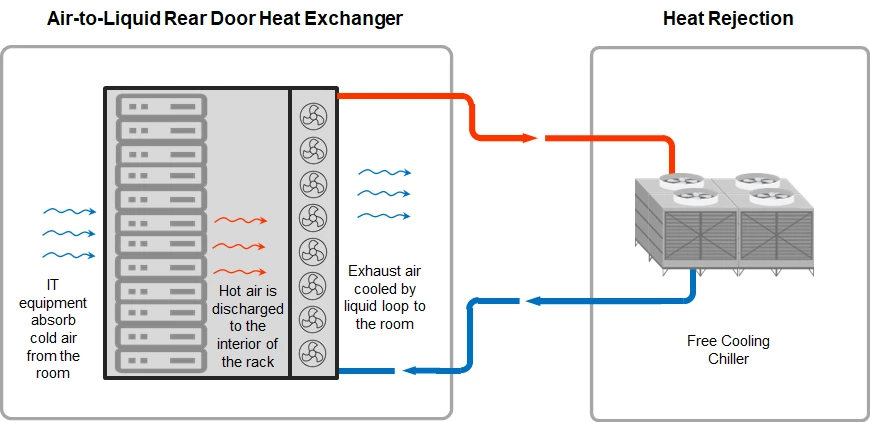
A rear-door heat exchanger (RDHx) is installed at the back of a server rack. Instead of allowing hot exhaust air to enter the data hall, the system passes that air through a heat exchanger where liquid removes the heat.
The cooled air is then returned to the room.
RDHx can be attractive when operators want to increase rack cooling capacity without modifying the internal server architecture.
Where RDHx Fits
RDHx is particularly useful for:
- Existing data centers
- Moderate-to-high rack densities
- Phased upgrades
- Facilities with established air-cooling infrastructure
- Deployments where server modification is undesirable
Its main advantage is relatively low disruption.
The servers remain air-cooled internally, while the rack-level heat exchanger removes a large portion of the heat before it reaches the room.
For retrofit projects, this can make RDHx a practical intermediate step between conventional air cooling and full direct-to-chip deployment.
Learn more about ATTOM Rear Door Heat Exchanger →
Direct-to-Chip Liquid Cooling
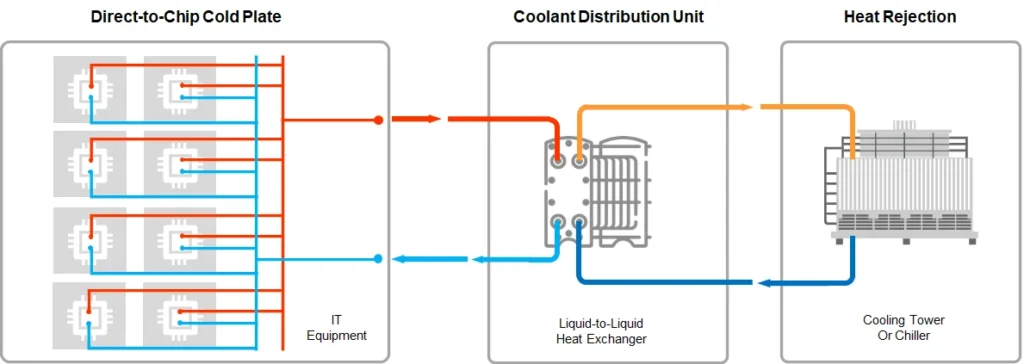
Direct-to-chip (D2C) cooling places a cold plate directly against high-power components such as CPUs or GPUs.
Coolant flows through channels inside the cold plate and absorbs heat directly from the processor package.
The basic thermal path becomes:
Chip → cold plate → liquid → CDU → facility cooling loop
This is significantly shorter than the traditional air-cooling path.
D2C is particularly suitable for AI and HPC environments because it targets the components generating the greatest amount of heat.
A typical system may include:
- Cold plates
- Supply and return manifolds
- Quick-disconnect fittings
- CDU
- Pumps
- Sensors
- Control systems
- Facility-side heat rejection
The architecture can also support hybrid servers in which some components continue to use air cooling.
This is important because not every component in a modern server necessarily produces enough heat to justify direct liquid cooling.
ATTOM’s ByteCool platform is designed around this rack-level and chip-level architecture, with CDU, manifold, connector, and heat-rejection components forming an integrated cooling system.
For a deeper engineering discussion, see ATTOM’s dedicated D2C Pillar:
Direct-to-Chip Liquid Cooling: Working Principle, Architecture and Engineering Guide →
Immersion Cooling
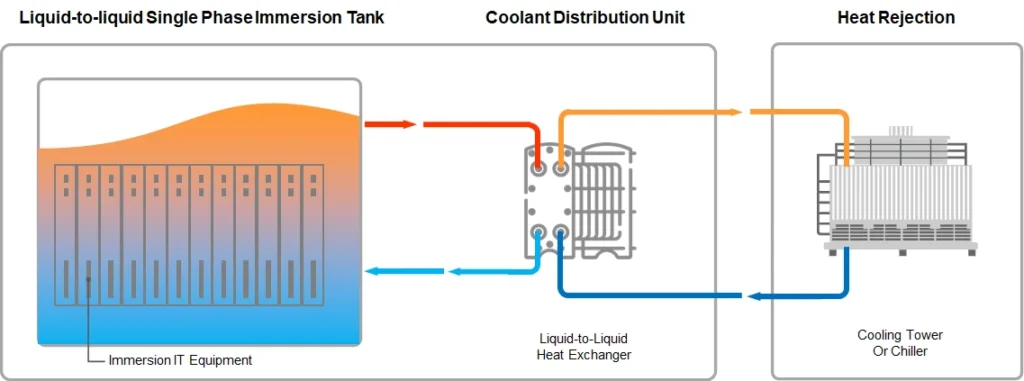
Immersion cooling takes a different approach.
Instead of attaching a cold plate to selected components, compatible servers or IT assemblies are immersed in a dielectric cooling fluid.
Because the fluid is electrically non-conductive, it can contact energized electronic components without creating a conventional electrical short circuit.
Two major architectures are used.
Single-Phase Immersion Cooling
The coolant remains liquid throughout the cooling cycle.
Pumps circulate the heated dielectric fluid through a heat exchanger, where the heat is rejected before the cooled fluid returns to the tank.
This approach has relatively straightforward thermal behavior and can be suitable for sustained high-density workloads.
Two-Phase Immersion Cooling
The dielectric fluid changes phase as it absorbs heat.
The fluid boils at the heat source, and the vapor is subsequently condensed and returned to the liquid state.
Two-phase systems can achieve very high heat-transfer performance, but they introduce additional requirements around fluid management, system design, materials, sealing, and operational control.
Immersion cooling therefore should not be selected simply because it offers the highest theoretical heat-transfer capability. Server compatibility, service procedures, fluid management, facility design, and long-term operating requirements all need to be evaluated.
For a deeper discussion of immersion technology and deployment:
Immersion Cooling for Data Centers: Advantages and Deployment →
Liquid-to-Air Hybrid Cooling
Not every facility can install a new water distribution system or redesign its entire heat-rejection infrastructure.
Liquid-to-air hybrid systems provide another option.
In this architecture, liquid collects heat from the IT equipment and then transfers that heat to air through a heat exchanger. The existing data center air-cooling system can subsequently remove the heat from the room.
This approach can be useful when the objective is to introduce liquid cooling without making major changes to the facility water infrastructure.
It is especially relevant to:
- Retrofit projects
- Edge data centers
- Medium-density deployments
- Temporary or transitional infrastructure
- Facilities with limited chilled-water capacity
ATTOM’s ByteCool platform also includes liquid-to-air Sidecar architecture designed for traditional data center environments where extending a facility water system may be difficult.
Liquid Cooling vs. Air Cooling
Liquid cooling and air cooling should not be treated as competing technologies in every deployment.
Air cooling remains effective for many conventional workloads, particularly where rack density is moderate and existing cooling infrastructure has sufficient capacity.
Liquid cooling becomes more attractive as thermal density increases.
| Factor | Air Cooling | Liquid Cooling |
|---|---|---|
| Heat-transfer medium | Air | Liquid |
| High-density capability | More limited by airflow and heat-transfer constraints | Higher potential |
| Infrastructure complexity | Lower in conventional facilities | Higher |
| Retrofit simplicity | High | Depends on architecture |
| Cooling near chip | Indirect | Direct or near-source |
| Fan dependence | Higher | Can be reduced |
| AI/HPC suitability | Application-dependent | Strong |
| Typical deployment strategy | Room/rack cooling | Rack/chip/immersion or hybrid |
For many modern facilities, the practical answer is not “air or liquid.”
It is:
Use air cooling where it remains economical, and introduce liquid cooling where thermal density makes it necessary.
This hybrid approach is particularly relevant as data centers increasingly contain a mixture of conventional enterprise workloads and high-density AI or HPC infrastructure.
When Does a Data Center Need Liquid Cooling?
Rack power alone should not be used as the only decision criterion.
A better evaluation considers the relationship between:
IT power density + workload characteristics + existing cooling capacity + future expansion
Liquid cooling becomes increasingly relevant when:
- Rack density is rising rapidly.
- GPU or accelerator workloads dominate the facility.
- Airflow management is becoming difficult.
- Cooling capacity is limiting rack deployment.
- Hot spots persist despite optimized airflow.
- Increasing CRAC/CRAH capacity is becoming uneconomical.
- The facility needs substantially higher compute density.
- Future server generations are expected to increase thermal loads.
The transition point varies by server architecture and facility design.
A rack that is manageable with air cooling today may become difficult to cool after a GPU or server refresh.
For this reason, cooling architecture should be designed around the future rack density, not only the equipment being installed today.
Benefits of Liquid Cooling in Data Centers
1.Higher Thermal Capacity
Liquid can transport significantly more heat in a given flow path than air, making it suitable for high-density thermal loads.
2.Higher Rack Density
By moving heat closer to the source, liquid cooling can allow more computing power to be deployed within a smaller physical footprint.
3.Reduced Airflow Requirements
When a substantial portion of server heat is removed through liquid, the facility does not need to move the same amount of air to remove that heat.
4.Improved Thermal Control
Direct cooling of high-power components can reduce localized thermal stress and improve temperature stability under sustained workloads.
5.Energy Efficiency Potential
Liquid cooling can reduce the energy required for fans and air movement and can work effectively with free cooling or higher-temperature heat-rejection strategies.
However, the actual efficiency improvement depends on the complete system.
Pumps, CDUs, chillers, heat exchangers, and heat-rejection equipment all consume energy.
Liquid cooling should therefore be evaluated at the system level, not by comparing the efficiency of a liquid loop with an air heat sink in isolation.
6.Better Support for AI and HPC
High-performance computing creates concentrated thermal loads that are difficult to distribute through conventional room-level air cooling.
Liquid cooling allows thermal design to follow the compute architecture more closely.
For AI data centers, this is particularly important because GPU and accelerator density can increase much faster than conventional room-level cooling infrastructure was designed to accommodate.
AI Data Center: A Complete Guide to AI Infrastructure, Power, Cooling, and Design →
Liquid Cooling and PUE
Power Usage Effectiveness (PUE) is often used to evaluate data center energy efficiency:
PUE = Total Facility Energy / IT Equipment Energy
Cooling is one of the major contributors to facility overhead.
A liquid cooling system can improve PUE by reducing fan power, improving heat-transfer efficiency, and enabling more efficient heat-rejection strategies such as free cooling.
But liquid cooling does not automatically guarantee a lower PUE.
A poorly designed liquid cooling system can introduce additional pump, CDU, chiller, or heat-rejection energy consumption.
The correct question is therefore not:
“Does liquid cooling reduce PUE?”
It is:
“Does the complete cooling architecture reduce facility overhead for this workload and operating environment?”
This distinction becomes particularly important when comparing new-build and retrofit projects.
For broader context on data center efficiency, see ATTOM’s PUE resource.
Understanding PUE in Data Centers →
AI Data Center PUE Calculator →
Liquid Cooling for Data Center Retrofits
Retrofitting an existing data center requires a different approach from designing a new liquid-cooled facility.
Existing constraints may include:
- Limited floor loading
- Existing chilled-water capacity
- Pipe routing
- Rack dimensions
- Server compatibility
- Electrical capacity
- Maintenance access
- Leak detection requirements
- Existing CRAC/CRAH infrastructure
- Limited shutdown windows
A phased deployment is often more practical than converting an entire facility at once.
For example:
Existing air cooling → RDHx → hybrid liquid cooling → D2C for selected racks
This allows operators to validate cooling performance and operational procedures before expanding the liquid cooling footprint.
Direct-to-chip systems can also be deployed selectively in high-density racks while conventional racks continue using air cooling.
This mixed architecture is likely to remain important because data centers rarely have uniform rack densities.
Key Components of a Liquid Cooling System
A liquid cooling project involves more than the cooling equipment itself.
CDU
The CDU manages the interface between the IT-side liquid loop and the facility-side cooling loop.
Cold Plates
Cold plates provide direct thermal contact with CPUs, GPUs, and other high-power components in D2C systems.
Manifolds
Manifolds distribute coolant to multiple servers and collect the return flow.
Quick-Disconnect Connectors
Quick connectors allow IT equipment to be installed or serviced without unnecessarily draining the entire cooling loop.
Pumps
Pumps maintain the required coolant flow and pressure.
Heat Exchangers
Heat exchangers transfer heat between cooling loops or between liquid and air.
Sensors and Controls
Temperature, pressure, flow, and leak monitoring provide the information required for stable operation and early fault detection.
A well-designed system treats these components as one architecture rather than as independent products.
For example, ATTOM’s ByteCool architecture integrates CDU, manifolds, connectors, and cold-plate-based heat capture into a coordinated direct-to-chip cooling system.
ATTOM D2C Liquid Cooling Solution →
What Should Operators Consider Before Deploying Liquid Cooling?
1. Define the Target Rack Density
Start with current and projected rack power.
Designing a liquid cooling system for today’s workload only can create another infrastructure bottleneck when server power increases.
2. Confirm Server Compatibility
Not every server is designed for every liquid cooling architecture.
Check:
- CPU/GPU compatibility
- Cold plate requirements
- Connector configuration
- Manufacturer support
- Warranty conditions
- Fluid compatibility
This is especially important for D2C and immersion systems.
3. Evaluate Existing Facility Infrastructure
Determine whether the site has adequate:
- Chilled water
- Dry cooling
- Heat rejection
- Pump capacity
- Pipe routing
- Electrical capacity
- Monitoring infrastructure
The IT cooling loop cannot be evaluated independently from the facility.
4. Plan for Leak Detection and Response
Liquid introduces a new operational risk that air-cooled facilities largely avoid.
The design should include appropriate:
- Leak detection
- Isolation mechanisms
- Drainage strategy
- Connector design
- Inspection procedures
- Emergency response procedures
The goal is not simply to prevent every possible leak. It is to ensure that a localized fault can be detected, isolated, and serviced before it becomes a major operational event.
5. Consider Maintenance
Liquid cooling changes the maintenance workflow.
Technicians may need procedures for:
- Coolant handling
- Loop isolation
- Filter replacement
- Pump maintenance
- Connector inspection
- Sensor calibration
- Cold plate servicing
Operational readiness should be part of the design phase rather than added after installation.
6. Design for Expansion
AI infrastructure can change quickly.
A cooling architecture should ideally support:
- Higher rack densities
- Additional racks
- New GPU generations
- Increased flow requirements
- Modular CDU expansion
- Future heat-rejection capacity
A system that works perfectly at initial deployment but cannot expand economically may become a constraint within a few years.
How to Choose the Right Liquid Cooling Technology
The decision can be simplified into four questions.
How Dense Is the Rack?
If density is moderate, RDHx or hybrid cooling may be sufficient.
If processor-level heat becomes the dominant issue, D2C becomes more attractive.
How Much of the Existing Infrastructure Can Be Changed?
If the facility needs a low-disruption upgrade, rack-level or hybrid solutions may have an advantage.
How Much Modification Can the IT Equipment Tolerate?
D2C requires compatible cold plates and liquid interfaces.
Immersion requires even more significant hardware and operational compatibility.
What Is the Long-Term Infrastructure Plan?
A technology that works for a small AI cluster may not be the best architecture for a 10-year high-density data center roadmap.
The best solution is therefore determined by the entire infrastructure context, not by cooling technology specifications alone.
For organizations evaluating the economic side of this decision, ATTOM also provides a dedicated analysis of liquid cooling ROI and high-density computing.
Liquid Cooling in Modern Data Centers: Unlocking ROI in High-Density Computing →
Are Liquid Cooling Data Centers More Reliable?
Liquid cooling does not inherently make a data center more or less reliable.
Reliability depends on system architecture, component quality, redundancy, installation, monitoring, maintenance, and operating procedures.
A mature liquid cooling deployment should consider:
- Pump redundancy
- CDU redundancy where required
- Leak detection
- Flow monitoring
- Temperature monitoring
- Pressure monitoring
- Automatic alarms
- Isolation capability
- Service procedures
- Spare components
The reliability objective should be comparable to the reliability standard of the rest of the data center infrastructure.
In other words, liquid cooling should be designed as mission-critical infrastructure, not treated as an accessory attached to the rack.
Liquid Cooling for New Data Centers vs. Existing Facilities
The economics and engineering priorities are different.
New Data Centers
New construction allows cooling architecture to be designed together with:
- Electrical distribution
- Rack layout
- Pipe routing
- Heat rejection
- Structural requirements
- Monitoring
- Maintenance access
This provides the greatest freedom to optimize the complete system.
Existing Data Centers
Retrofit projects must work around existing constraints.
The preferred strategy is often incremental deployment, starting with the racks where air cooling has become the largest limitation.
This can reduce project risk and avoid unnecessary replacement of infrastructure that still performs well.
For high-density AI infrastructure, modular and prefabricated deployment can also provide a way to integrate power and cooling infrastructure more closely.
The Future of Liquid Cooling
The future of data center cooling is unlikely to be a complete transition from air to liquid.
Instead, cooling architectures will become increasingly workload-aware.
Traditional enterprise racks may continue using optimized air cooling.
Medium-density racks may use rear-door heat exchangers.
High-density AI racks may use direct-to-chip cooling.
Specialized ultra-dense workloads may use immersion cooling.
The result is a layered cooling environment in which different technologies coexist within the same facility.
This approach gives operators more flexibility to match cooling capacity with actual thermal demand.
As AI infrastructure continues to increase rack density, the most important development will not simply be higher-capacity cooling equipment. It will be the integration of IT hardware, liquid distribution, controls, heat rejection, power infrastructure, and facility design into a single thermal architecture.
Liquid cooling will therefore become increasingly connected to broader AI infrastructure decisions involving:
- Rack density
- Power distribution
- AI/HPC workload design
- Modular data center architecture
- Monitoring and controls
- Facility expansion
ATTOM Liquid Cooling Solutions
ATTOM provides liquid cooling solutions for high-density computing environments, covering rack-level and direct-to-chip cooling architectures as well as immersion cooling.
The current portfolio includes:
- ByteCool D2C Liquid Cooling for direct-to-chip applications
- SmoothAir Rear Door Heat Exchanger for rack-level heat removal
- OceanCool Immersion Cooling for immersion-based high-density deployments
ATTOM’s liquid cooling systems are designed to support both new data center projects and phased upgrades of existing facilities. Depending on the application, solutions can be integrated with existing air-cooling infrastructure or connected to dedicated facility cooling loops.
For AI and HPC deployments, the objective is not simply to add liquid to the data center. The cooling architecture should be matched to rack density, server design, facility constraints, expansion requirements, and operational strategy.
ByteCool — Direct-to-Chip Liquid Cooling
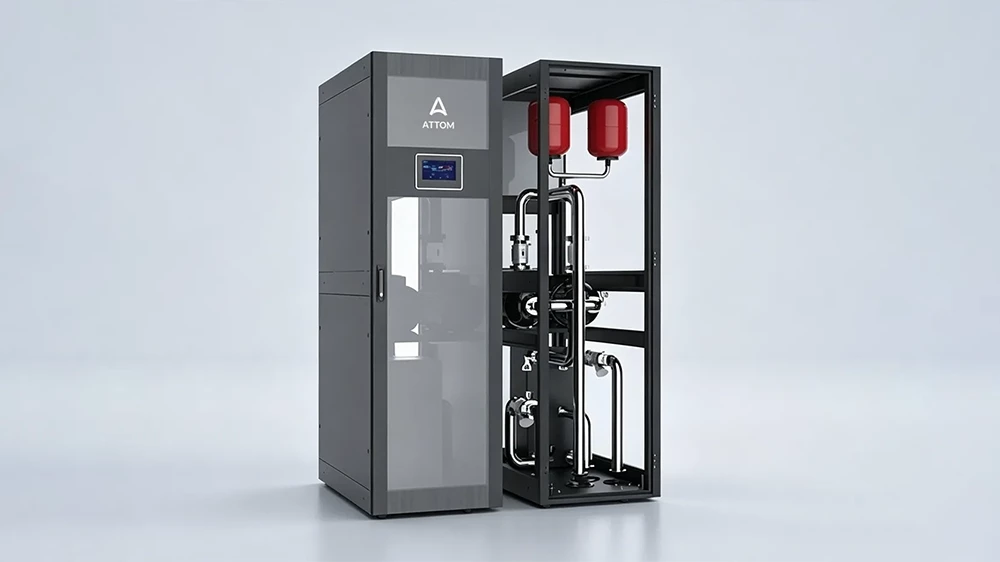
ByteCool is ATTOM’s direct-to-chip liquid cooling platform for high-density CPU, GPU, AI, and HPC applications.
Explore ATTOM D2C Liquid Cooling Solution →
OceanCool — Immersion Cooling
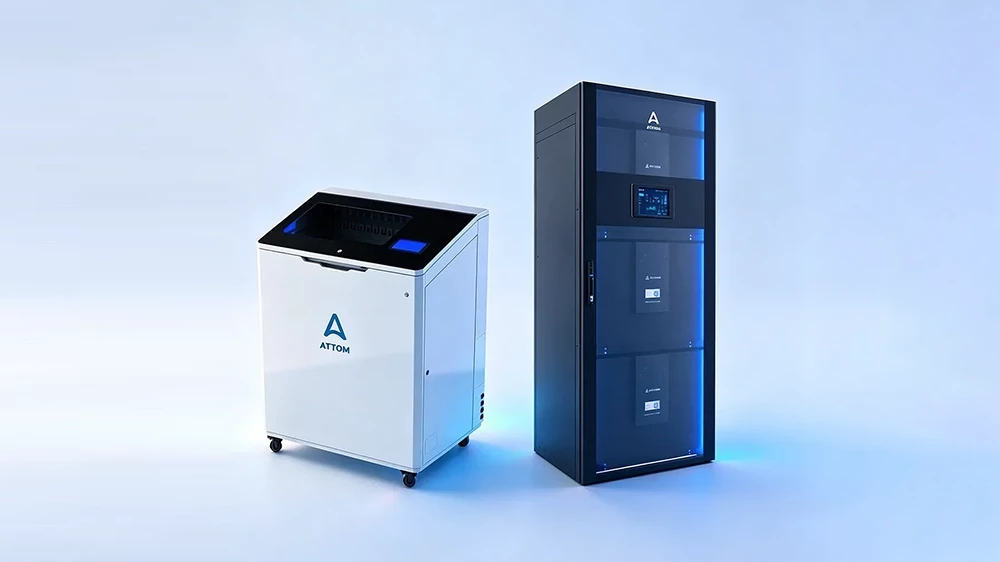
OceanCool is ATTOM’s immersion cooling solution for high-density environments where direct liquid-to-equipment heat transfer is appropriate.
Explore ATTOM Immersion Liquid Cooling Solution →
SmoothAir — Rear-Door Heat Exchanger
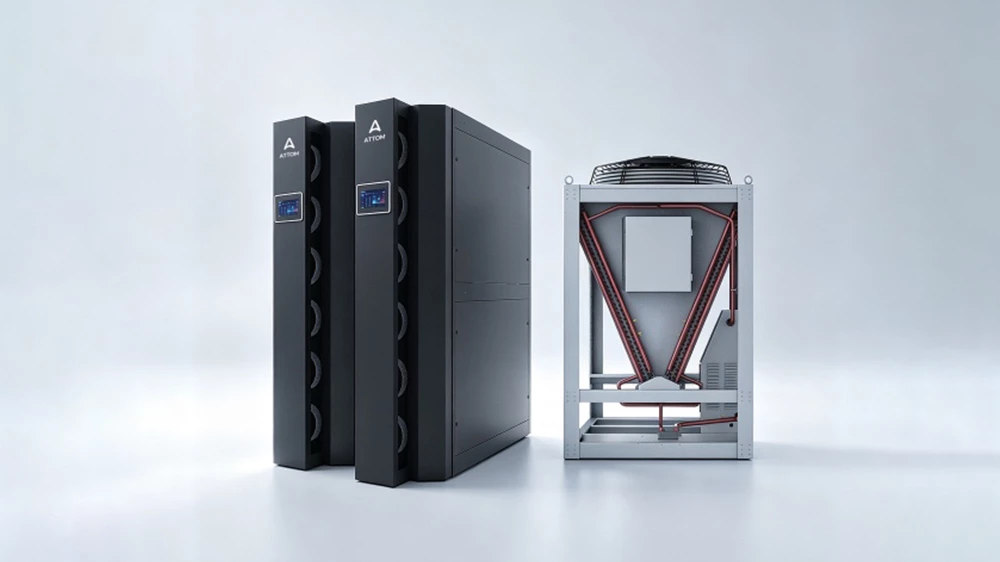
SmoothAir provides rack-level heat removal for high-density environments where maintaining air-cooled servers and minimizing IT equipment modification are important considerations.
ATTOM’s portfolio therefore supports multiple liquid cooling strategies rather than forcing every deployment into a single architecture.
Explore ATTOM Rear Door Heat Exchanger Solution →
Frequently Asked Questions
What is liquid cooling in a data center?
Liquid cooling is a thermal management method that uses liquid to remove heat from IT equipment. Depending on the architecture, the liquid may cool server exhaust air, contact cold plates attached to CPUs and GPUs, or directly surround compatible IT equipment in an immersion system.
What are the main types of liquid cooling?
The main approaches include rear-door heat exchangers, direct-to-chip cooling, immersion cooling, and liquid-to-air hybrid systems. Each has different infrastructure requirements and is suited to different rack densities and deployment conditions.
Is liquid cooling better than air cooling?
Not in every situation. Air cooling remains effective for many conventional workloads. Liquid cooling becomes more valuable as rack power density and thermal loads increase.
Is liquid cooling suitable for existing data centers?
Yes. Retrofit options include rear-door heat exchangers, hybrid liquid-to-air systems, and selected direct-to-chip deployments. The appropriate solution depends on existing cooling infrastructure, rack density, server compatibility, and available space.
Does liquid cooling reduce PUE?
It can, but there is no automatic PUE improvement. The result depends on the complete cooling system, including pumps, CDUs, chillers, heat exchangers, and heat-rejection equipment.
Does liquid cooling eliminate air cooling?
Usually not. Many modern data centers use hybrid architectures in which liquid cooling handles high-density components while air cooling manages the remaining thermal load.
What is a CDU in liquid cooling?
A Coolant Distribution Unit (CDU) manages the liquid cooling loop between IT equipment and the facility cooling system. It can regulate coolant temperature, flow, pressure, and heat transfer while providing monitoring and control.
Is liquid cooling safe?
Properly designed liquid cooling systems can operate safely in data centers. Safety depends on appropriate components, fluid selection, leak detection, isolation, maintenance procedures, and system integration.
Is liquid cooling suitable for AI data centers?
Yes. Liquid cooling is increasingly relevant to AI data centers because high-power GPUs and accelerators create concentrated thermal loads that can become difficult to manage with conventional air cooling alone.
What is the best liquid cooling technology for a data center?
There is no single best technology for every deployment. RDHx may be appropriate for retrofit environments, direct-to-chip cooling is well suited to many high-density AI and HPC deployments, and immersion cooling can support specialized ultra-high-density workloads.
The appropriate choice depends on rack density, server architecture, facility infrastructure, maintenance requirements, and long-term expansion plans.
Conclusion
Liquid cooling has become an important part of data center infrastructure as computing density continues to increase.
The key decision is not whether liquid cooling is “better” than air cooling. The more useful question is where liquid cooling creates enough thermal and operational value to justify its infrastructure requirements.
For some facilities, that may mean adding rear-door heat exchangers to a small number of high-density racks.
For AI and HPC environments, direct-to-chip cooling may provide the most practical path to higher rack density.
For specialized workloads, immersion cooling can offer a different thermal architecture altogether.
The strongest liquid cooling strategy is therefore one that starts with the workload, rack density, facility constraints, and long-term expansion plan—and then selects the cooling architecture that fits those requirements.
For organizations planning liquid cooling data centers, this approach provides a practical path toward higher compute density, controlled thermal performance, and scalable infrastructure.
Last updated: August 2026