
PDU Buying Guide: How to Choose a Data Center PDU →
Choosing the right PDU (Power Distribution Unit) is about more than counting outlets or selecting the highest current rating. A data center PDU must match the rack’s electrical requirements, IT equipment, installation layout, redundancy strategy, monitoring needs, and future power demand.
The wrong PDU can create problems after a rack is deployed. Insufficient capacity can limit future expansion, incompatible outlets can complicate cabling, and inadequate monitoring can make rack-level power capacity difficult to manage.
This PDU buying guide explains the practical factors to evaluate when selecting a PDU for a data center, including power capacity, voltage, phase configuration, outlet types, form factor, monitoring, redundancy, and future rack density.
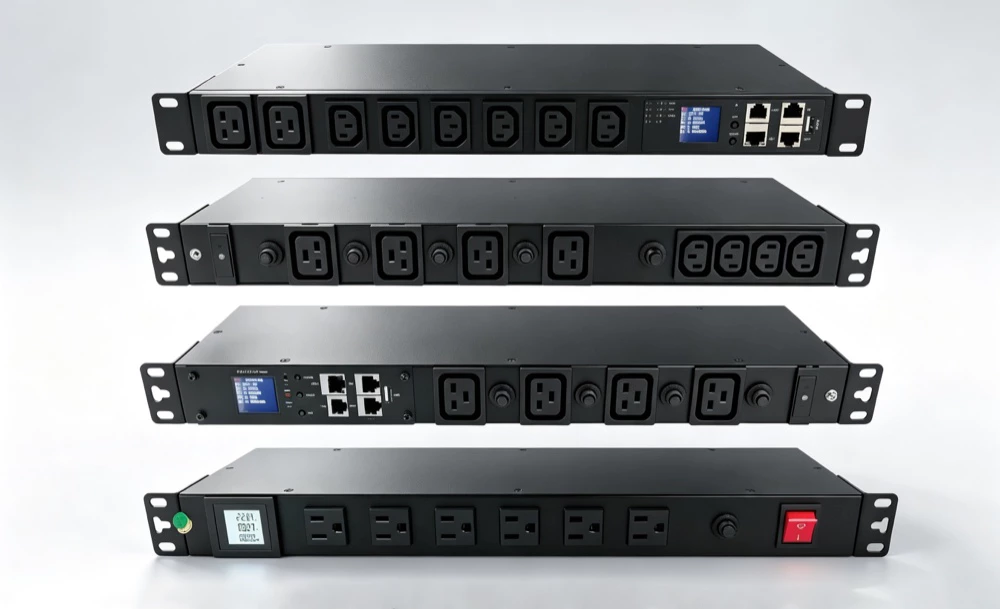
What Should You Consider When Buying a Data Center PDU?
A practical PDU selection process should evaluate eight factors:
- Rack power requirements
- Voltage and phase configuration
- PDU current and power capacity
- Outlet type and quantity
- Form factor and installation method
- Monitoring and management requirements
- Redundant power architecture
- Future rack power density
The right combination depends on the actual rack and data center power architecture.
For a broader explanation of what a PDU is and the main types of data center PDUs, see ATTOM’s Data Center PDU guide.
1. Determine the Rack Power Requirement
Start with the equipment that will be installed in the rack.
Estimate the expected power consumption of:
- Servers
- GPU servers
- Storage systems
- Network switches
- Security appliances
- Other rack-mounted equipment
Do not size the PDU only from the current equipment list. Consider how the rack may change over its operating life.
For example, a rack initially populated with conventional servers may later accommodate higher-power CPUs, GPUs, storage, or networking equipment.
The basic principle is:
PDU capacity should support the expected operating load while maintaining appropriate design margin for future growth.
Nameplate power ratings can be useful for planning, but actual measured power consumption can provide a more realistic basis for capacity management once equipment is operating.
2. Check Voltage and Phase Configuration
The PDU must be compatible with the upstream electrical infrastructure and the connected IT equipment.
Common considerations include:
- Input voltage
- Output voltage
- Single-phase or three-phase power
- Frequency
- Current rating
- Input connector
Single-Phase PDU
Single-phase PDUs are commonly used for lower-power racks and smaller IT deployments.
They can be appropriate when the upstream electrical system and rack load do not require three-phase distribution.
Three-Phase PDU
Three-phase PDUs are commonly used in higher-density data center environments because they can support larger electrical loads and more efficient power distribution.
The decision should not be based simply on whether three-phase is “better.” The PDU must match the facility’s electrical architecture and the power requirements of the rack.
For high-density deployments, three-phase distribution may provide more usable capacity within the available electrical infrastructure.
3. Match the PDU Current and Power Capacity
PDU capacity is one of the most important selection criteria.
The PDU’s current rating must be compatible with:
- Upstream circuit capacity
- PDU input configuration
- Expected rack load
- Electrical protection
- Required operating margin
A PDU should not be selected simply because its maximum rating is higher than the current rack load.
The complete power path must be evaluated.
For example:
Upstream Circuit → PDU Input → PDU Distribution → IT Equipment
The PDU cannot provide more usable capacity than the constraints imposed by the upstream electrical system.
Avoid Designing Only for Today’s Load
A rack may initially consume substantially less power than the PDU’s maximum rating.
That does not necessarily mean the PDU is oversized.
Future equipment additions, server upgrades, and higher-density workloads can change rack power requirements significantly.
A reasonable amount of capacity headroom can reduce the need for disruptive PDU replacement later.
4. Choose the Right PDU Type
PDU types primarily differ in their level of monitoring and control.
Basic PDU
A Basic PDU provides power distribution without advanced monitoring or remote control.
It can be appropriate when:
- Rack loads are stable
- Power monitoring is not required
- Remote operation is unnecessary
- Simplicity and cost are priorities
Metered PDU
A Metered PDU provides power measurements at the PDU level.
It can help operators understand:
- Total current
- Voltage
- Power
- Overall rack load
Metered PDUs are useful when basic power visibility is needed without advanced outlet-level management.
Monitored PDU
A Monitored PDU provides more detailed power information and may support branch- or outlet-level monitoring.
It is useful when operators need:
- More granular power visibility
- Capacity planning
- Load monitoring
- Energy reporting
- Threshold alerts
Switched PDU
A Switched PDU adds remote outlet control to power monitoring.
It can allow authorized operators to:
- Remotely power-cycle equipment
- Turn selected outlets on or off
- Manage equipment at remote sites
- Reduce the need for physical access
Intelligent PDU
An Intelligent PDU combines advanced monitoring, communication, and potentially remote control and system integration.
It can be appropriate for high-density, remote, or highly managed environments.
For a detailed discussion of Intelligent and Smart PDUs, see ATTOM’s Intelligent PDU guide.
5. Select the Right Outlet Type and Quantity
Outlet compatibility is an easily overlooked part of PDU selection.
Common data center PDU outlet types include:
- IEC C13
- IEC C19
The correct combination depends on the power connectors used by the equipment.
C13 vs. C19
C13 outlets are commonly used for standard IT equipment.
C19 outlets are designed for higher-current connections and are often used with higher-power servers and other high-density equipment.
The correct outlet configuration should be based on the actual equipment being deployed rather than simply maximizing the number of outlets.
How Many Outlets Do You Need?
Start with the equipment list and identify:
- Number of devices
- Number of power supplies per device
- A/B power requirements
- Planned equipment additions
- Spare outlets
A rack with dual-power servers may require significantly more PDU connections than a rack with the same number of physical devices but single power supplies.
The objective is not to fill every outlet. The objective is to provide enough compatible connections while maintaining reasonable flexibility for future changes.
6. Choose the Right PDU Form Factor
The physical configuration of the PDU affects rack space, cable management, and installation.
The two common configurations are:
Vertical 0U PDU
A vertical 0U PDU is mounted along the side or rear of the rack and does not occupy standard rack units.
Advantages include:
- No loss of horizontal rack space
- High outlet density
- Convenient rack-level deployment
- Better use of available cabinet space
Vertical PDUs are widely used in modern server racks.
Horizontal 1U or 2U PDU
Horizontal PDUs occupy standard rack units and are installed within the rack’s mounting space.
They can be useful when:
- Rack layout requires horizontal installation
- Vertical mounting space is unavailable
- A specific cabinet configuration is required
The choice should consider both the PDU itself and the resulting cable routing.
7. Decide How Much Monitoring You Need
Not every rack requires an Intelligent PDU.
The appropriate monitoring level depends on operational requirements.
| Requirement | Suitable PDU Level |
|---|---|
| Basic power delivery | Basic PDU |
| Overall load visibility | Metered PDU |
| Detailed power monitoring | Monitored PDU |
| Remote outlet control | Switched PDU |
| Monitoring + control + integration | Intelligent PDU |
Monitoring becomes more valuable when rack density, equipment turnover, or operational complexity increases.
For example, a small stable rack may not need outlet-level monitoring.
A high-density rack containing GPU servers may benefit significantly from more granular power visibility.
8. Consider A/B Power Redundancy
Critical servers often have two power supplies.
In a redundant configuration, one power supply may connect to an A power path while the other connects to a B power path.
The two paths may originate from separate upstream power systems.
A simplified architecture is:
Power Path A → PDU A → Server PSU A
Power Path B → PDU B → Server PSU B
The purpose is to reduce the impact of a failure or maintenance event affecting one power path.
When selecting PDUs for redundant racks, verify:
- Number of independent power paths
- PDU capacity on each path
- Outlet compatibility
- Load distribution
- Upstream circuit capacity
- Monitoring requirements
A redundant rack should not be treated as a single PDU selection problem.
Each power path must have sufficient capacity for the intended operating architecture.
9. Plan for High-Density and AI Racks
AI and GPU computing are changing rack power requirements.
High-density racks can require substantially more power than conventional enterprise server racks, making PDU selection increasingly important.
For high-density applications, evaluate:
- Higher current capacity
- Three-phase configurations
- High-density outlet requirements
- A/B power distribution
- Load monitoring
- Rack-level power visibility
- Future expansion
- Integration with infrastructure management systems
An Intelligent PDU can provide additional visibility into high-density rack loads, but it does not replace adequate upstream electrical capacity.
The PDU must be considered as part of the complete power architecture.
For AI deployments, power distribution should be evaluated together with UPS capacity, rack design, power density, and cooling infrastructure.
10. Consider PDU Monitoring and DCIM Integration
If the data center uses Data Center Infrastructure Management (DCIM), check whether the PDU can provide the required data and communication interfaces.
Potential capabilities include:
- SNMP
- Web-based management
- APIs
- Power measurement
- Alarm notifications
- Environmental sensors
- Remote outlet control
DCIM integration can turn PDU measurements into operational information that supports:
- Capacity planning
- Rack monitoring
- Energy analysis
- Alarm management
- Asset management
- Infrastructure optimization
The key question is not simply whether a PDU supports “smart” features, but whether its data can be used effectively within the existing management environment.
11. Evaluate Environmental and Operating Conditions
PDU selection should also consider the physical environment in which the equipment will operate.
Depending on the deployment, evaluate:
- Operating temperature
- Humidity
- Installation orientation
- Cable routing
- Rack depth
- Clearance
- Maintenance access
- Environmental monitoring requirements
This is particularly important for high-density racks where power and thermal conditions are closely related.
An Intelligent PDU with environmental sensors can provide additional rack-level visibility, but environmental monitoring should still be considered as part of the overall cooling and facility monitoring strategy.
12. Compare the Total Cost, Not Just the Purchase Price
The lowest-cost PDU is not always the lowest-cost option over its operating life.
Consider:
- Initial purchase price
- Installation cost
- Cabling requirements
- Monitoring requirements
- Network integration
- Maintenance
- Future expansion
- Replacement difficulty
- Operational labor
For example, a Basic PDU may have the lowest initial cost, while an Intelligent PDU may provide greater operational value in a large or high-density facility.
The right choice depends on whether the additional functionality solves a real operational requirement.
PDU Selection Checklist
Before purchasing a PDU, verify the following:
- Expected rack power load
- Required power capacity
- Input voltage
- Output voltage
- Single-phase or three-phase configuration
- Current rating
- Input connector
- Outlet type
- Number of outlets
- A/B power redundancy requirements
- Vertical 0U or horizontal 1U/2U installation
- Basic, Metered, Monitored, Switched, or Intelligent PDU
- Power monitoring requirements
- Remote control requirements
- DCIM or network integration
- Environmental monitoring requirements
- Future rack power growth
- Maintenance and replacement considerations
Common PDU Selection Mistakes
Choosing Based Only on Outlet Count
More outlets do not necessarily mean a better PDU.
The PDU must have the correct electrical capacity, connector configuration, and installation format for the rack.
Selecting Only for Current Load
Designing around today’s power consumption can create capacity constraints when equipment is upgraded.
Future rack density should be considered during the initial selection.
Ignoring the Upstream Electrical System
A PDU cannot compensate for insufficient upstream capacity.
The entire electrical path must be evaluated from the source to the rack.
Over-Specifying Monitoring
Advanced monitoring is valuable when the data will actually be used.
A small stable deployment may not benefit enough from expensive outlet-level monitoring to justify the additional complexity.
Ignoring Redundancy
For critical IT equipment, PDU selection should account for A/B power architecture from the beginning.
Adding redundant power paths after a rack is populated can be significantly more difficult.
PDU Buying Guide: Quick Decision Framework
A simple selection process can be summarized as:
Step 1 — Determine rack load
Estimate current and future IT power requirements.
Step 2 — Confirm electrical compatibility
Check voltage, phase, current, frequency, and upstream circuit capacity.
Step 3 — Define redundancy
Determine whether the rack requires A/B power paths.
Step 4 — Select the physical configuration
Choose vertical 0U or horizontal 1U/2U based on rack layout and cabling.
Step 5 — Select outlet configuration
Match C13, C19, and other connectors to the IT equipment.
Step 6 — Select monitoring capability
Choose Basic, Metered, Monitored, Switched, or Intelligent based on operational requirements.
Step 7 — Plan for future density
Account for equipment upgrades and higher-power workloads, especially AI and GPU deployments.
Step 8 — Verify integration
Confirm compatibility with DCIM, network management, and environmental monitoring systems when required.
PDU Buying Questions
What size PDU do I need?
Choose a PDU based on the expected rack power load, electrical configuration, redundancy requirements, and future expansion. Do not size it only according to the current number of devices.
Should I choose a single-phase or three-phase PDU?
The choice depends primarily on the upstream electrical architecture and rack power requirements. Three-phase PDUs are commonly used for higher-density applications, while single-phase PDUs can be appropriate for lower-power deployments.
How many outlets should a PDU have?
The PDU should provide enough compatible outlets for all connected equipment, including dual-power devices and reasonable future expansion. Outlet count should not be considered independently from PDU capacity.
Is a 0U PDU better than a 1U PDU?
Neither is universally better. A vertical 0U PDU preserves horizontal rack space and can provide high outlet density, while a horizontal 1U or 2U PDU may be more appropriate for certain rack layouts.
Do I need an Intelligent PDU?
Choose an Intelligent PDU when detailed power visibility, remote control, environmental monitoring, or DCIM integration provides operational value. Simpler racks may only require a Basic or Metered PDU.
What is the difference between a Metered and Monitored PDU?
A Metered PDU generally provides overall PDU-level power measurements, while a Monitored PDU can provide more granular information, potentially including branch- or outlet-level monitoring.
What PDU is best for an AI data center?
There is no single PDU configuration that fits every AI data center. High-density AI racks typically require careful evaluation of current capacity, phase configuration, outlet types, redundancy, monitoring, and future power growth. Intelligent PDUs can provide additional rack-level visibility where detailed monitoring is required.
Can I replace a PDU after installing the rack?
Yes, but replacement can require physical access, equipment shutdown or power-path coordination, and recabling. Selecting the appropriate PDU during initial rack design can reduce the complexity of future changes.
Final Takeaway
The right data center PDU is the one that matches the rack’s electrical capacity, equipment connections, physical layout, redundancy architecture, monitoring requirements, and future power demand.
For simple and stable deployments, a Basic or Metered PDU may be sufficient. More dynamic or high-density environments may benefit from Monitored, Switched, or Intelligent PDUs.
As rack power density increases, particularly with AI and GPU workloads, PDU selection should be treated as part of the broader data center power architecture rather than as a standalone equipment purchase.